
From measurements to a costed quotation in minutes, not an evening with Excel
FabSuite is cloud-based fabrication software built specifically for small aluminium and uPVC window/door fabrication businesses. Set up your profile catalog, cutting formulas, and pricing once — every job after that gets accurate live costing, an optimized cutting plan, and a shop-branded PDF quotation automatically, from any browser.
✓ 30-day trial activated
✓ setup guide on its way
// the problem — why shops lose money on paperwork, not fabrication
Three ways shops lose money today
None of these show up as a single bad day — they quietly cost real money, job after job, until nobody remembers a time it was different.
Slow, error-prone, no live recalculation when a rate changes, no way to see cutting wastage before you cut, and a quote that looks like a spreadsheet — not a professional proposal.
The established desktop tools in the fenestration industry are powerful but costly, tied to an annual licence, desktop-only, and built for cutting plans alone — not for a shop that also wants to run its sales pipeline.
No way to track a lead from first inquiry through site visit, quotation, and negotiation to a won job — so real opportunities quietly fall through the cracks.
function fabQuote() { // click a stage to inspect
Measurement to quotation, in one workflow
Enter your profile catalog, your own cutting formulas per window type, and your rate card — once. This is your shop's real, calibrated know-how, captured in the system instead of a notebook.
- ✓Profile catalog — bars you actually stock
- ✓Your own cutting formulas, not a fixed template
- ✓Rate card — every edit versioned, never rewrites an old quote
Add a plain window, a composite multi-section frame, a folding door, a curtain-wall bay, or frameless glass — each gets a real to-scale technical drawing automatically, and live costing down to the paisa as you build it.
- ✓All 5 opening types, one designer
- ✓Automatic technical drawing, no manual sketching
- ✓Profile, accessory, glazing & finish cost — live
FabSuite bin-packs every required cut length against your real stock bar length — honoring the saw's kerf and end-trim — grouped by profile code across the whole project, so you see exactly how much material gets wasted before a single bar is cut.
- ✓Optimized against your real stock bar length
- ✓Planned across the entire project, not window by window
- ✓Wastage % shown per profile and for the whole job
One click produces a shop-branded customer PDF — cover letter, per-window technical drawing, itemized pricing, terms, and a signature page — plus internal-only reports for the owner: cutting schedule, bill of quantities, and cost breakdowns.
- ✓Shop-branded, professional customer PDF
- ✓Internal reports kept away from staff
- ✓Finalized numbers frozen — a later rate change never moves an old quote
Capture a lead (phone, WhatsApp, walk-in, referral), log site-visit measurements, and track it through New Inquiry → Contacted → Site Visit → Quotation Sent → Negotiation → Won/Lost — with automatic follow-up reminders so nothing is forgotten. Convert a won lead straight into a project with one click.
// what your team actually sees
Inside FabSuite
Real screens from the live product — not mockups.
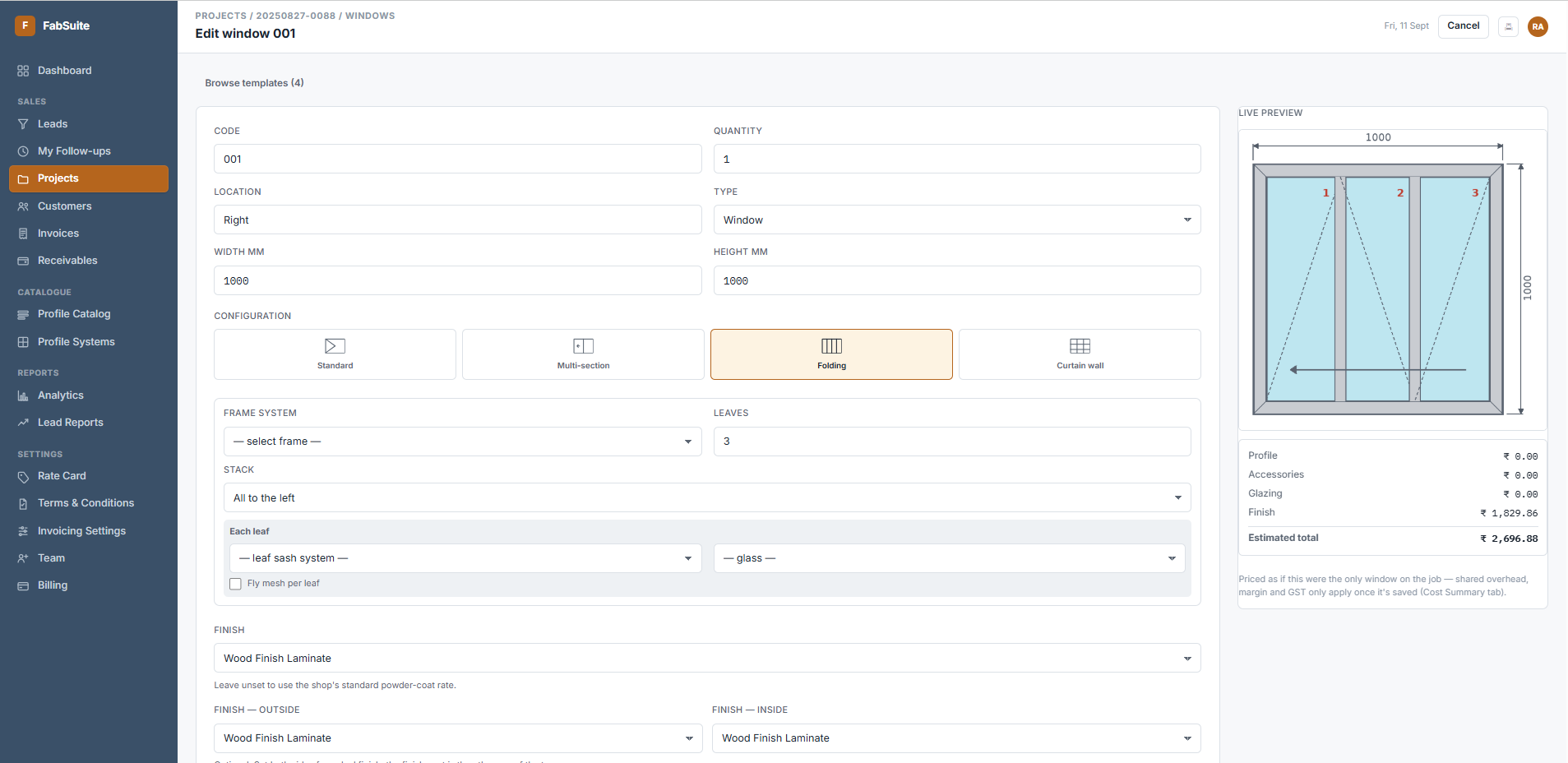
Every opening gets a real, to-scale technical drawing automatically — no manual sketching.
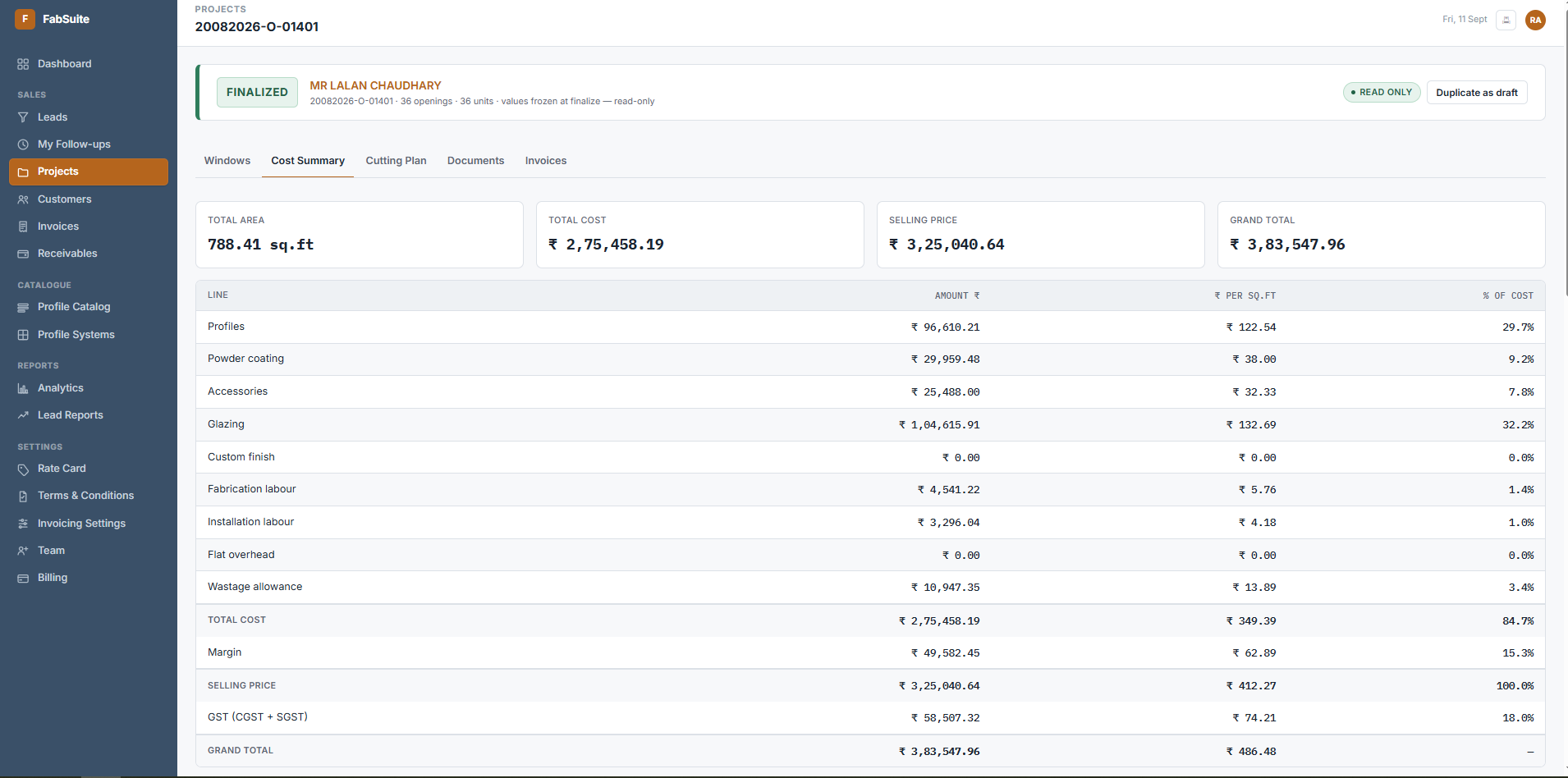
Live, to-the-paisa costing — every category itemized, nothing hidden in a single total.
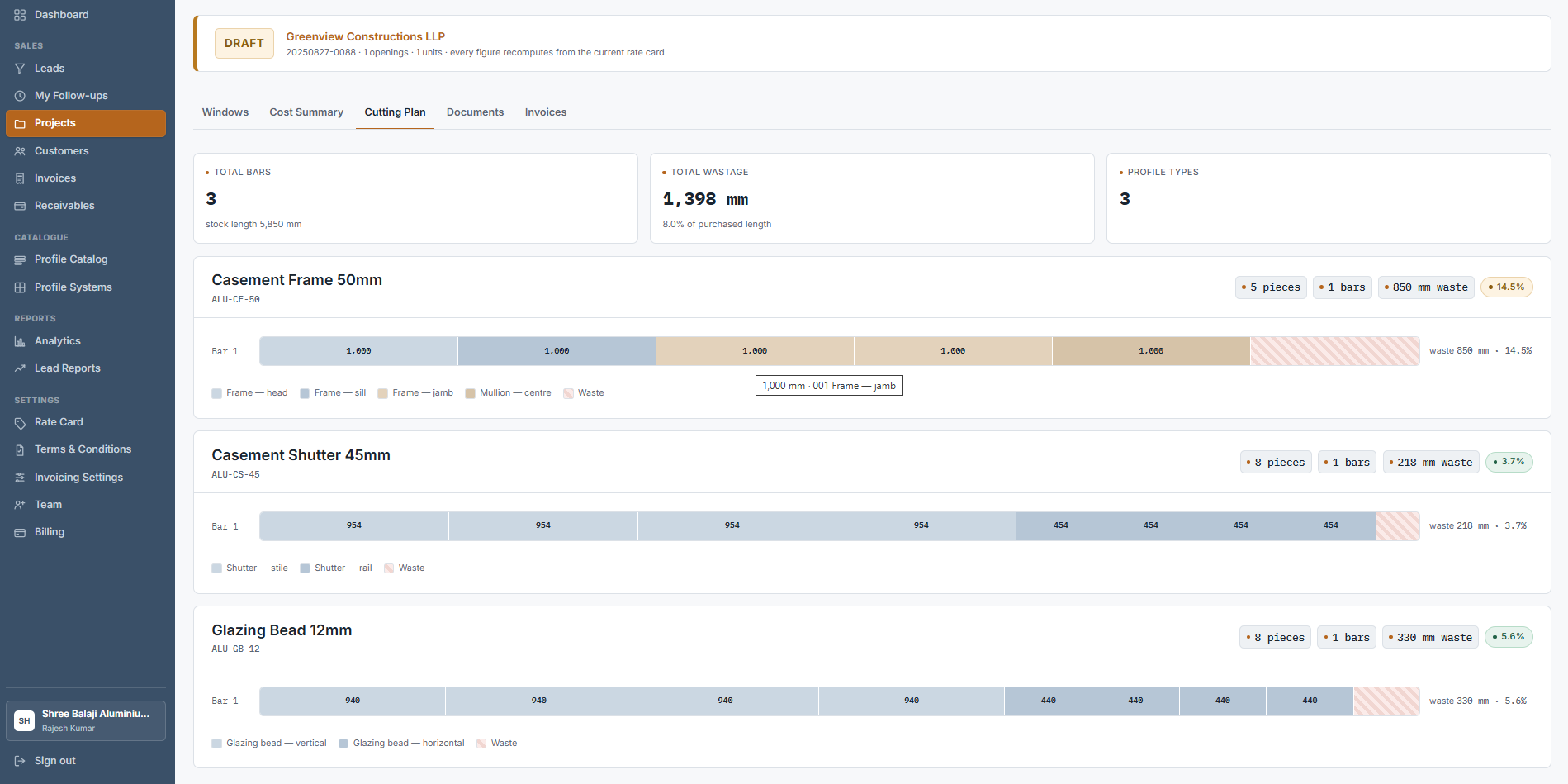
Wastage you can actually see, bar by bar, before a single cut is made.
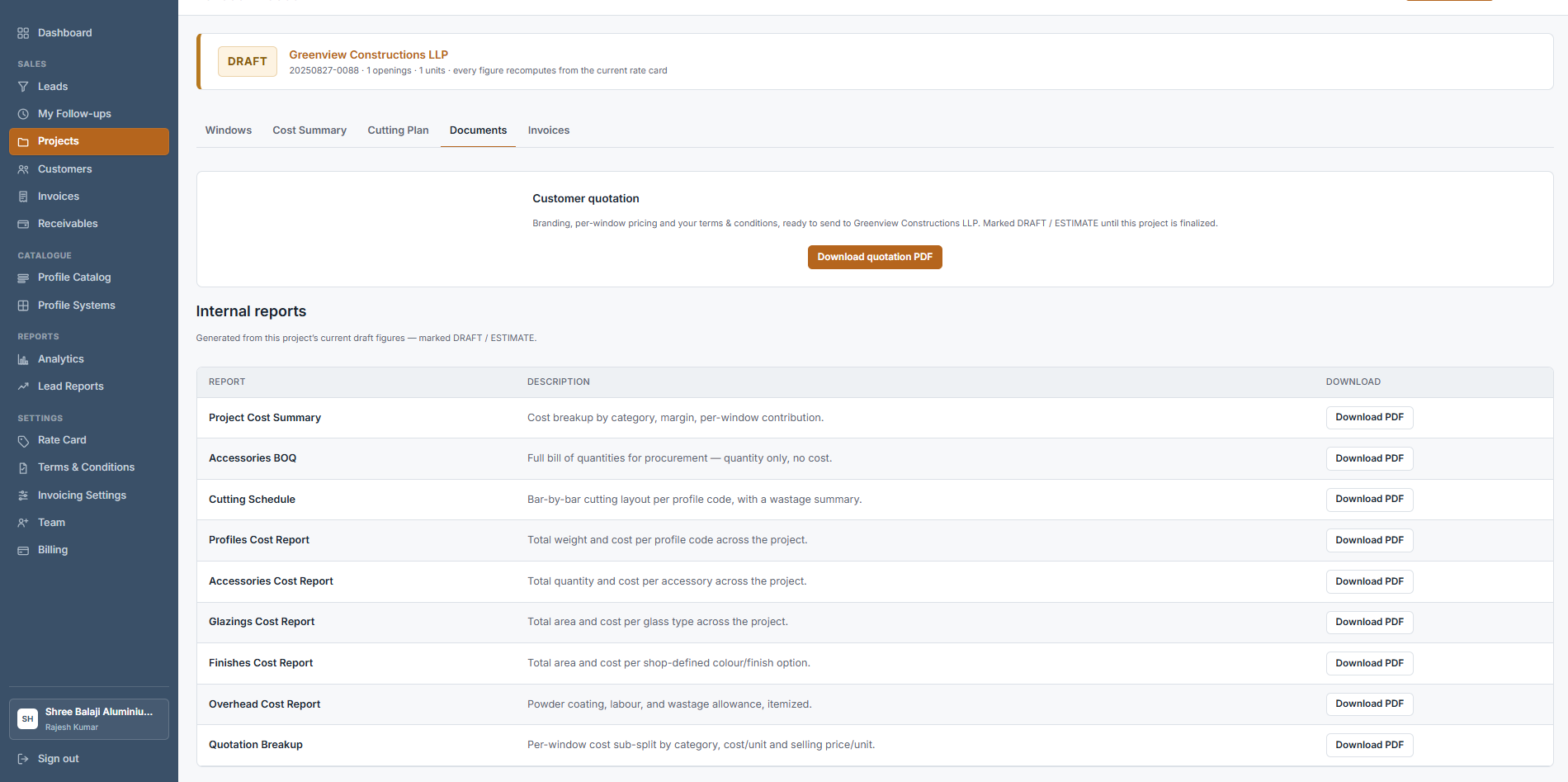
A shop-branded customer PDF, plus internal reports kept away from staff.
// built for every job you take — not just plain windows
One engine, every opening type
Most costing and cutting optimization software handles a plain sliding window and stops there. FabSuite costs and cutting-plans all five, through the same engine.
Sliding, casement, tilt & turn, and fixed lights — any of your shop's own systems.
One outer frame, several sections side by side — a fixed light next to a casement, or a 3-part "Chicago" window.
2 to 12 leaves, with correct per-junction hinge-stile and per-leaf hardware costing.
A mullion/transom grid of any size — cells individually marked vision glass, spandrel, vent, or infill panel.
Glass and patch fittings, no aluminium frame to cut — costed and drawn the same way as everything else.
const features = [ // full feature tour by module
Everything FabSuite runs for you
Cutting-formula templates per window/door type, with a live preview against a test size before you save.
Enter a real historical job's known-correct cut lengths and see exactly how far off the current formula is — with the fix applied inline.
Flat, per-sq.ft, or per-leaf quantities per system, with brand/colour labels that print on the customer quote.
Profile, accessory, glazing, finish, and motorised-automation cost — computed the same way, every time.
Powder-coating, labour, wastage allowance, and any flat project charge spread fairly across every opening by area.
Once a project is finalized, the price is locked — a later rate-card change never silently moves a customer's quote.
Optimized against your real stock bar length, honoring saw kerf and end-trim allowance.
Grouped by profile code across the entire project, not window by window — where the real efficiency gain comes from.
A clear wastage % per profile and for the whole project — and anything too long to fit any bar is flagged, never silently mis-packed.
Cover letter, per-window technical drawing, itemized pricing, terms & conditions, and a signature page.
Cost summary, cutting schedule, bill of quantities, and category cost breakdowns — kept away from staff who shouldn't see margins.
Catches anything missing — a section with no glass, an operable sash with no hardware — before a project can be locked.
Phone, WhatsApp, walk-in, or referral — tracked through New Inquiry → Contacted → Site Visit → Quotation Sent → Negotiation → Won/Lost.
A two-touch schedule after a quote goes out, tied to your own quote-validity period — plus a "My Follow-ups" view so nothing slips.
Revenue trend, sales funnel, product mix, margin composition, and repeat-customer rate — from real finalized-project data.
// two roles, one workspace
Your margins stay yours
Full access — rate card, margins, team, billing, and every internal cost report. Sees the whole business, not just the jobs.
Builds and manages projects, leads, and quotes freely — but never sees the shop's internal cost rates, margins, or billing.
const pricing = [ // monthly subscription, everything included
One plan. No tiers to navigate.
Every feature on this page is included from day one — there's no upsell ladder waiting for you later.
Flat. One shop, one price — full catalog, costing engine, cutting optimization, quotations, and the optional sales pipeline.
- ✓Unlimited profiles, systems & rate cards
- ✓All 5 opening types, one engine
- ✓Live costing & cutting optimization
- ✓Branded PDF quotations & internal reports
- ✓Sales pipeline & owner-only analytics
- ✓Owner + staff roles, team invites
// fabsuite.faq.md
Before you write in
No — FabSuite is cloud-based fabrication software delivered through your browser. It works from a browser on a desktop in the office or a phone on the shop floor. Nothing to install, always the latest version, and your data stays safely in the cloud.
That's exactly how it's built to work. FabSuite doesn't assume how a shop cuts — you enter your own formulas per window type once, and calibration mode lets you check them against a real historical job before you rely on them.
Yes. Staff accounts can build and manage projects, leads, and quotes, but never see your rate card, margins, or billing — that's Owner-only.
Nothing — a finalized project's numbers are frozen the moment you lock it. Editing your rate card later never retroactively changes a price you already quoted.
Yes — every shop gets its own fully isolated workspace. There's no cross-shop visibility, ever.
Most fenestration and aluminium quotation software is sold as an annual licence, often installed on one computer. FabSuite is cloud-based and priced as a flat monthly subscription — no year-long commitment, nothing to install, and it works from any browser on any device.
Small shops first. One flat monthly price, no per-user fees, and no long contract. If your shop is still quoting jobs on paper or in Excel, that's exactly who FabSuite is built for.
// you might also need
Custom business systems built to fit how you actually operate.
Bespoke tools when nothing off-the-shelf fits your workflow.
Senior engineers embedded with your team, on demand.
Browse the full catalogue of ready-made products.
$ ./fabsuite --start-trial
Quote your next job in minutes
Start your 30-day free trial — no credit card required. Set up your catalog once, and every job after that gets accurate costing and a cutting plan automatically.